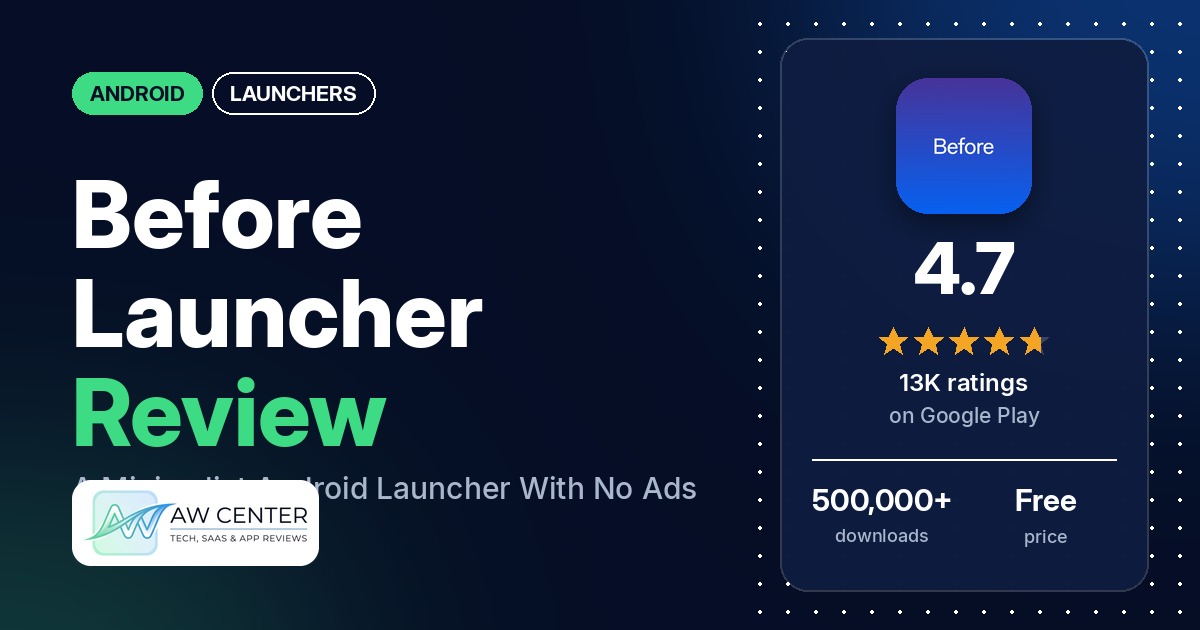
Before Launcher | Go Minimal is a free Android launcher that replaces the usual home screen with a short list of the apps you choose. It has no ads, and the Pro upgrade is a one-time purchase.
Quick verdict
If you want a calmer, simpler phone and would sooner pay once than subscribe, Before Launcher is worth a look. The most common praise in our sample is that it helps people use their phone less or cuts distractions, and several reviewers like the notification filter and how much the free version includes. The complaints we counted most often are battery drain, freezes, recent apps and gestures that stop working, notification problems, and no support for standard Android widgets. Those are minority reports: only about 4% of all its ratings are 1 or 2 stars. Several of them recur, though.
Before Launcher at a glance
| Developer | Before Labs |
|---|---|
| Store listing | Before Launcher on Google Play |
| Price | Free, with optional in-app purchases ($1.99–$6.99 per item) |
| Ads | None (the listing says “No ads, EVER”) |
| Play Store rating | 4.7 stars from 13,371 ratings (88% are 5-star) |
| Downloads | 500,000+ |
| Version / last updated | 9.2.0-99746816453 / September 22, 2026 |
| Requires | Not in our data |
| First released | March 14, 2019 |
| Data checked | October 14, 2026 |
What is Before Launcher?
Before Launcher replaces your phone’s home screen. The listing describes it as a minimalist launcher that “maximizes your time by minimizing the look of your phone”: a short home screen of your most important apps, a searchable list of everything else one swipe away, and a filter that keeps trivial notifications quiet. It has been on Google Play since 2019 and was last updated in September 2026. The listing promises no ads and no subscriptions, with a one-time Pro purchase for all of your devices.
Key features
- Minimal home screen: quick launch of the apps you pick, and the listing says the home screen is configurable.
- App list: all your apps in a scrollable, sortable and searchable list. The listing says you can sort apps by size, install date and the last time you used them.
- Folders, pins and hidden apps: group apps into folders, pin apps to the top of the list, and hide apps you don’t want to see. The listing marks hiding as a Pro feature.
- Notification filter: trivial notifications arrive without vibration or sound and wait in a filtered drawer you open with a swipe. Notifications you mark as important still alert you.
- Themes and icons: photo, gradient and solid themes, or your own, plus the developer’s icon styles and third-party icon packs.
- Widgets: the listing describes free widgets for date and time, battery, weather, and your average screen unlocks for the day and week.
- Double-tap to turn off the screen: optional, using Android’s Accessibility Service, which the listing says is off by default.
- Guided setup: the listing says a guided process gets you set up quickly.
Before Launcher vs. what a launcher app should have
The Status column shows where we found each feature. “Listed” means the Google Play listing names it. “Partial” means the listing covers part of it. “Reviews and developer replies” and “Reviews only” mean we found it outside the listing. “Not listed” means neither the listing nor the reviews in our sample show the app has it. This is our first checklist for launchers, written from this listing, its reviews and the developer’s replies, and it will change as we review more launchers. It records which features the app offers; it doesn’t measure how well each one works.
Must have
| Feature | Status | Notes |
|---|---|---|
| Home screen with the apps you choose | Listed | |
| Searchable, sortable app list | Listed | Sort by size, install date or last used |
| Folders and pinned apps | Listed | A developer reply (June 2025) says folders come with Pro. A few reviewers report folder bugs. |
| Hiding apps | Listed | Pro, per the listing |
| Easy setup as the default launcher | Listed | The developer’s replies point to Settings > “Set Default Launcher” |
| Gestures and navigation settings | Partial | The listing mentions one-swipe access and double-tap; developer replies point to Settings > Gestures. Several reviewers report gestures that misfire. |
| Usable free tier | Partial | The listing says it is free with no ads, but doesn’t spell out what Pro adds beyond hiding apps. Several reviewers praise the free version; a few say fonts, spacing or folders need Pro. |
Should have
| Feature | Status | Notes |
|---|---|---|
| Notification filtering | Listed | Several reviewers praise it; several report problems |
| Icon styles and third-party icon packs | Listed | A few reviewers say icon packs don’t work for them |
| Themes and wallpapers | Listed | A few reviewers report wallpaper or background problems |
| Font and text-size options | Reviews and developer replies | A developer reply (July 2026) mentions fonts, text color and size; another (January 2025) says home-screen text size needs Pro |
| Built-in widgets | Listed | Date and time, battery, weather and screen unlocks |
| Standard Android widgets from other apps | Not listed | Several reviewers ask for them. Developer replies in 2026 say support is being worked on. |
| Renaming apps | Reviews and developer replies | Pro, through “Change label” in the long-press menu |
| Backup and restore | Reviews and developer replies | Asked for by two reviewers in 2024 and 2025; one reviewer in August 2026 says a backup option is now available |
| Works without internet | Not listed | Two reviewers in 2024 said it wouldn’t open or shut down when offline |
Nice to have
| Feature | Status | Notes |
|---|---|---|
| Screen-unlock stats | Listed | Average unlocks per day and week, as a widget |
| App timers, blocking or a delay before opening | Not listed | A few reviewers ask for them |
| Double-tap to turn off the screen | Listed | Optional, off by default |
| Extra sort options | Listed | Size, install date, last used |
| Automatic light and dark themes | Not listed | Two reviewers ask for the theme to follow the system’s light or dark mode |
| Notification dots or badges | Not listed | One reviewer went back to their previous launcher for missed-call and text badges |
| Website shortcuts | Reviews and developer replies | Free, per a developer reply (June 2025) |
| Tablet and e-reader support | Reviews only | One reviewer praises it on tablets, another on a Boox e-reader |
| No ads | Listed | |
| One-time purchase for all devices | Listed | A few reviewers say Pro didn’t carry over or didn’t register |
Common problems and fixes
Most of the problems below come from 1- to 3-star reviews, which make up about 7% of all ratings. The fixes come from the developer’s replies to those reviews. Replies are dated, settings names may have changed since, and newer versions may behave differently. Where a reply blames Android or a phone maker, that is the developer’s view, and we didn’t check it.
| Problem | What reviewers report | What the developer’s replies say |
|---|---|---|
| Battery drain | Several reviewers, February 2024 to April 2026 | Turn off the notification filter and watch battery use; often another app is sending lots of notifications to filter (January 2026). An earlier reply suggested disabling the double-tap accessibility service to test (April 2024). |
| Launcher freezes or gets stuck | Several reviewers, November 2023 to August 2026, naming phones such as the Pixel 8a, Pixel 9a and a Xiaomi Ultra | Turn animations off in Before’s Settings > Homescreen and in Android Settings > Accessibility > Color and motion > Remove animations (December 2023, April 2025). The developer’s replies say Pixels and Android 14 aren’t working well with third-party launchers. |
| Recent apps or app switcher stops working | Several reviewers, February 2024 to August 2025 | The developer’s replies call it an Android bug that affects third-party launchers, and offer a workaround by email (August 2025). |
| Gestures open the wrong thing | Several reviewers, September 2023 to August 2026 | Restart the phone, clear Before Launcher’s cache in Android Settings > Apps, and try the “Re-open” option in Before’s settings (October 2025). Gesture options are in Settings > Gestures (March 2026). |
| Keyboard pops up on its own | A few reviewers, April to August 2026 | Check the “Always show keyboard” toggle in Settings > Apps, and how the swipe-up gesture is set in Settings > Gestures (April and August 2026). |
| Notification sound won’t stop, or replaces an app’s own sound | Two reviewers, February and March 2024 | Settings > Notification Filter, then turn off minimal alerts so your Android alert settings apply (February and March 2024). |
| Important or system notifications filtered | A few reviewers say important notifications didn’t show; one, in June 2024, said the filter affected their phone’s emergency alerts | “Unfiltered Apps” works as a whitelist, and turning off Settings > Notification Filter > System app notifications stops the filtering of system notifications (June 2024). |
| Notification filter stops working | Several reviewers report filter problems | Battery-saving settings or apps can remove Before’s notification access; the developer’s FAQ covers this (November 2024). Granting access can be tricky on Redmi and Huawei phones (February 2026). |
| Folders won’t open or don’t show | A few reviewers, September 2023 to July 2025 | Restart, then Settings > Apps > Rescan, and update to the latest version (July 2025). Folders show on the Apps screen only with the default sort, and home-screen folders are chosen separately (December 2023). |
| Pro doesn’t show on another phone | A few reviewers, May 2024 to December 2025 | Pro is meant to work on all your devices; email support (May 2024), or clear the cache of Before Launcher and Google Play Services (February 2025). The Settings page shows a purple banner at the top if Pro isn’t active (March 2025). |
| Home-screen spacing changed after an update | A few reviewers say an update changed or removed something they relied on | Homescreen > “Adjust vertical spacing” (July 2026). |
| Home-screen apps changed or disappeared | Two reviewers | Long-press any home-screen app and use “Choose Homescreen apps” or “Reorder” (August 2026). |
The listing says Before Launcher’s widgets can show the weather. Don’t rely on a single app, or a home-screen widget, for severe weather warnings.
Pros (from user reviews)
- Less phone time and fewer distractions: the most common praise in our sample. Several reviewers say it cut their screen time, made it easier not to pick up the phone out of boredom, or removed distractions. One says their screen time fell from five hours a day to under two. On the other side, one reviewer says they spent more time on the phone, and a few ask for stronger focus tools, such as app timers, app blocking or a delay before an app opens.
- Clean and simple: that’s how several reviewers describe it. Two others say it looks ugly or outdated, and one finds it limiting.
- Easy to use: several reviewers call it easy to use, easy to navigate or intuitive. One reviewer who is registered blind says they got it set up, folders included. Two reviewers find it hard to get used to or unintuitive.
- Notification filter: the filtered notifications get praise from several reviewers, and one calls the filtered notification screen the best part of the app. Several others report problems with it (see Cons).
- Generous free version: several reviewers say the free version covers what they need or praise how much it includes. Two say Pro mostly adds extras. A few disagree, saying basics like custom fonts, spacing or folders are behind the paywall.
- One-time price: paying once, with no subscription, wins praise from several reviewers, as does the price itself. One Pro buyer says it wasn’t worth it for them.
- No ads: a few reviewers point out there are no ads, which matches the listing.
- Customizable: several reviewers say it is customizable while staying minimal or simple. Others want more control, such as a few who ask to change icons per app and a few who want custom folder icons.
- Runs well for several: several reviewers call it stable, solid, smooth or bug-free, and several say they have used it for years. The freeze and battery reports in Cons show that isn’t true for everyone.
- A responsive developer: a few reviewers praise quick replies from the developer. One says their messages to customer service went unanswered, and the developer replied that it had since answered by email.
Cons (from user reviews)
- Battery drain: several reviewers say it uses a lot of battery, and two compare it unfavourably with Nova Launcher. All of these reviews are 4 stars or lower. The developer’s replies call these reports rare and suggest testing with the notification filter turned off.
- Freezes and crashes: several reviewers say the launcher froze, hung, got stuck or crashed. Two say it got stuck halfway between the home screen and the app list, and one says the whole home screen sometimes disappears until they lock and unlock the phone. Reviewers name phones including the Pixel 8a and Pixel 9a, a Xiaomi Ultra, and one phone on Android 10.
- Recent apps and the app switcher: several reviewers say the recent apps button or gesture stops working with Before Launcher. Two say they had to restart the phone or reinstall the app to fix it. The developer’s replies say this is an Android bug that affects third-party launchers.
- Gestures and navigation: several reviewers say swipes open the wrong screen, the back gesture doesn’t return home properly, or gestures don’t work as expected. Two say scrolling is jumpy or misbehaves. A few say the keyboard pops up when they didn’t ask for it.
- Notification problems: several reviewers report problems with the filter. A few say important notifications didn’t show up. One reviewer wrote in June 2024 that the filter affected their phone’s emergency alert system, and a developer reply that month pointed to a setting that stops system notifications being filtered (see the table above; it may have changed since). Another says unfiltered notifications didn’t pop up and they rely on calendar reminders. Whatever launcher you use, don’t rely on one app for emergency or severe weather alerts. Two say the launcher changed or stuck notification sounds, and two report duplicate notifications.
- No standard widgets: several reviewers say it doesn’t support standard Android widgets from other apps, such as a calendar or a weather app’s widget. Several more ask for extra widgets, and two of them want music controls. Developer replies from 2026 say support for system widgets is being worked on.
- Pro purchase problems: a few reviewers say Pro didn’t carry over to another phone or couldn’t be restored, and one of them says they had to buy it twice. Another couldn’t tell whether the purchase went through.
- Folders and icon packs: a few reviewers report folders that won’t open, don’t show or lose apps. A few say icon packs don’t work for them.
- Updates that change things: a few reviewers say an update changed or removed something they relied on, such as home-screen spacing or folder icons.
- Wallpapers and themes: a few reviewers report wallpaper problems, such as an image that can’t be cropped or turns sideways, or a background that reverts. A few say a theme didn’t stick, reset or caused a blank screen; one says the daily reset was later fixed.
- Other complaints: two reviewers in 2024 said it wouldn’t work without an internet connection, two find the text too big, and two say it was hard to uninstall.
A third of the reviews in our sample are 1- or 2-star because of how the sample was drawn (see the last section). Across all ratings, about 4% are 1 or 2 stars and 88.3% are 5-star, so the problems above are reported by a small share of users.
Rating breakdown
| Stars | Ratings | Share |
|---|---|---|
| 5 | 11,789 | 88.3% |
| 4 | 627 | 4.7% |
| 3 | 363 | 2.7% |
| 2 | 152 | 1.1% |
| 1 | 416 | 3.1% |
Source: Google Play ratings histogram, checked October 14, 2026. The histogram adds up to 13,347 ratings, slightly fewer than the 13,371 total, and the shares are of the histogram total.
Pricing
Before Launcher is free to download and has no ads. In-app purchases are listed at $1.99 to $6.99 per item. There are no subscriptions, the listing says, and the paid unlock is a lifetime purchase for all of your devices. Hiding apps is marked as Pro in the listing, and the developer’s replies add folders (June 2025), renaming apps (March 2025 and March 2026) and home-screen text size (January 2025). In two replies, the developer offered a refund if Pro didn’t work out. A few reviewers say Pro didn’t carry over to another phone or couldn’t be restored, so after you buy, check that it shows as active in Settings.
Privacy and permissions
We couldn’t read the Google Play data safety section for Before Launcher, so we make no claim about what it declares there. The listing says the developer doesn’t track data that identifies you and lets you turn off its anonymous analytics. It says the notification filter asks for one access, which you can avoid by turning that feature off, and that the optional double-tap feature uses Android’s Accessibility Service, is off by default, and doesn’t collect or share data.
The listing also says “No required permissions”. The Play Store’s permissions list for the app shows: adjust your wallpaper size, approximate location (network-based), close other apps, control vibration, expand/collapse status bar, full network access, measure app storage space, modify or delete the contents of your USB storage, prevent device from sleeping, read Google service configuration, read the contents of your USB storage, set an alarm, set wallpaper, update component usage statistics, and view network connections. One reviewer in 2024 said the app kept asking for accessibility permission they had already granted.
Who it’s for
Before Launcher fits you if you want to pick up your phone less, like a short list of apps (two reviewers describe it as text-based), and want a notification filter without paying a subscription. It’s a weaker fit if you rely on standard Android widgets, need every notification to come through reliably, or are sensitive to battery drain. Reviewers report freezes or a broken recent apps button on some Pixel and Xiaomi models. If you have one of those phones, check that the basics work before you buy Pro.
FAQ
Is Before Launcher free?
Yes. It’s free to download, has no ads, and the listing says there are no subscriptions. If you want Pro, in-app purchases are listed at $1.99 to $6.99 per item, and the listing describes the paid unlock as a lifetime purchase. The listing marks hiding apps as Pro, and the developer’s replies add folders, renaming apps and home-screen text size.
Does Before Launcher drain the battery?
Several reviewers in our sample say it does. All of them rated it 4 stars or lower, and only about 4% of all ratings are 1 or 2 stars. The developer’s replies call these reports rare and suggest you turn off the notification filter to see whether another app’s notifications are the cause.
Can I use normal Android widgets in Before Launcher?
Not according to the reviews in our sample. Several reviewers say it doesn’t support widgets from other apps, and the listing describes only its own widgets for date and time, battery, weather and screen unlocks. Developer replies from February and March 2026 say support for system widgets is being worked on.
How do I switch back to my old launcher?
The developer’s replies say to go to Before Launcher’s Settings > “Set Default Launcher” and choose another launcher, or change the default home app in Android’s settings. To uninstall, a 2024 reply says to use the Play Store page or Android Settings > Apps, and that on Pixel phones you need to pick a different default home app first.
How this review was put together
We haven’t tested Before Launcher. This review is based on public information from official sources: the app’s Google Play or App Store listing and rating breakdown, the developer’s website when there is one, and recent user reviews on the store with the developer’s replies. Features and claims are the developer’s own descriptions; what users like and dislike comes from the store reviews. Everything was checked on October 14, 2026. Apps change with every update, so check the store listing before you install.